


What IP Rating Does Digital Signage Need?
Selecting the correct IP rating for digital signage protects internal electronics from dust, moisture, and extreme weather without overspending on unnecessary engineering. The required ingress protection level depends strictly on your installation environment, airflow requirements, and cleaning protocols.
Quick Answer for Indoor, Sheltered and Fully Outdoor Installations
- Indoor Retail and Corporate Spaces (IP20 to IP32): Protected against fingers, solid objects, and accidental light vertical dripping. These displays rely on ambient building climate control.
- Semi-Outdoor and Sheltered Spaces (IP54 to IP55): Ideal for covered train platforms, building overhangs, and drive-thru canopies. These ratings protect against windblown dust and splashing water or light water spray.
- Fully Exposed Outdoor Environments (IP65): The industry baseline for open-air digital out-of-home (DOOH) billboards, street kiosks, and public totems subjected to direct rainfall, airborne particulates, and dirt.
Why IP65 Is Common but Not Automatically Right for Every Project
IP65 is often treated as the default standard for outdoor digital signage because it provides total protection against dust ingress (6) and defends against multi-directional water jets (5). However, it is not always the best fit:
- Thermal Management Demands: A fully sealed IP65 chassis traps heat generated by high-brightness LCD panels and direct solar radiation, requiring specialized heat exchangers or closed-loop cooling.
- Unnecessary Capital Expense: Deploying an IP65 display inside a ventilated transit concourse or beneath an architectural canopy increases hardware costs where an IP54 or IP55 enclosure would perform reliably.
- Application Mismatch: Standard IP65 enclosures protect against rainfall, but they are not certified to withstand commercial high-pressure power washers or localized flood risks.
When IP66 or IP67 May Be Necessary
Certain ruggedized and high-exposure deployments require ingress ratings higher than IP65:
- IP66 (Powerful Water Jets): Essential for coastal installations exposed to gale-force, wind-driven surf, as well as industrial settings and bus terminals routinely cleaned with high-pressure water hoses.
- IP67 (Temporary Immersion): Critical for ground-recessed displays, subways, or installations in flood-prone zones where equipment must survive standing water up to 1 meter deep for 30 minutes.
What Does an IP Rating Mean on a Digital Signage Display?
How IEC 60529 Defines Ingress Protection
The Ingress Protection (IP) rating is a globally recognized standard defined by the IEC 60529 framework. It provides a structured way to measure how effectively a digital signage enclosure keeps out environmental contaminants. As a manufacturer, we use this code to communicate exactly how much protection your hardware offers against solid objects and liquid ingress.
First Digit: Protection Against Solid Objects and Dust
The first digit in the IP code, ranging from 0 to 6, indicates the level of protection against solid particles. A rating of 5 means the display is dust-protected, meaning limited dust ingress will not interfere with operations. A rating of 6 indicates a “dust-tight” enclosure, where no dust can enter under tested conditions, which is crucial for long-term internal component health.
Second Digit: Protection Against Water
The second digit, ranging from 0 to 9, measures moisture resistance. Lower numbers like 4 indicate protection against simple water splashes, while ratings of 5 and 6 certify resistance against water jets. Higher ratings relate to immersion, though these are rarely required for standard wall-mounted digital signage.
What the X Means in Ratings Such as IPX5 and IPX6
When you see an “X” in a rating—such as IPX5—it means the manufacturer has not provided a formal test rating for the first digit (solids). In the professional signage industry, this is often a red flag. We always recommend choosing units that provide full ratings (e.g., IP65) to ensure you have comprehensive data on both dust and water resistance.
Why an IP Rating Is a Test Classification, Not a General Quality Score
It is important to remember that an IP rating is a specific, laboratory-verified classification rather than a catch-all “quality” score. A display with a high IP rating is not necessarily built for extreme temperatures or high-impact environments. Selecting the right unit requires looking at the cooling methods and thermal management alongside the ingress protection to ensure the display can handle your specific climate and operational needs.
Digital Signage IP Rating Comparison Chart
Understanding the right ingress protection rating is essential for ensuring your hardware survives its intended environment. The following chart breaks down common IP codes to help you match your display to specific outdoor or industrial site conditions.
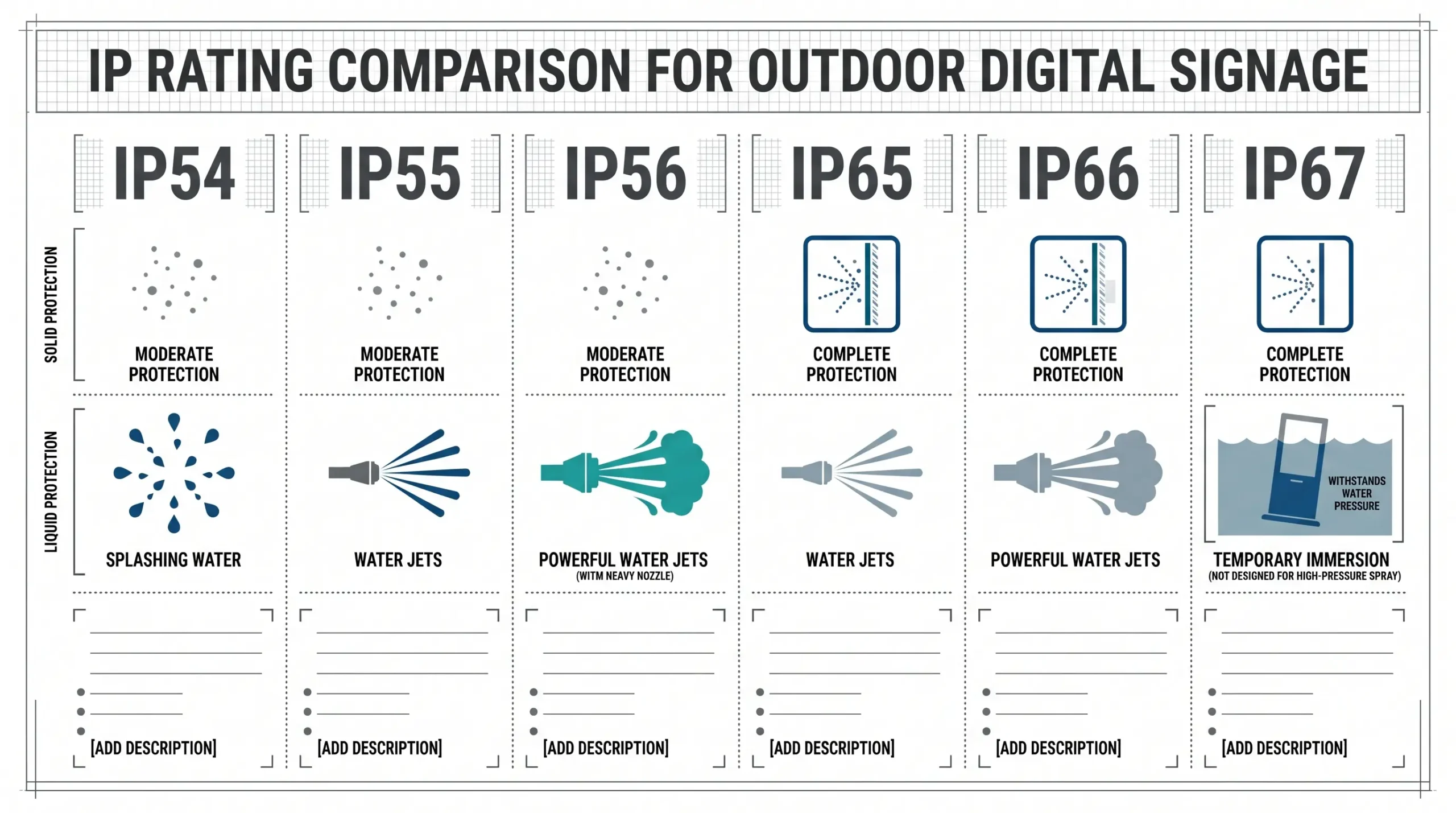
| IP Rating | Solids (Dust) Protection | Liquids (Water) Protection | Best Use Case |
|---|---|---|---|
| IP54 | Dust protected | Protected against splashing water | Sheltered, indoor entrances |
| IP55 | Dust protected | Protected against low-pressure water jets | Covered outdoor areas |
| IP56 | Dust protected | Protected against powerful water jets | High-exposure, non-submerged |
| IP65 | Dust-tight | Protected against low-pressure water jets | General outdoor street use |
| IP66 | Dust-tight | Protected against powerful water jets | Harsh, high-pressure cleaning sites |
| IP67 | Dust-tight | Protected against temporary immersion | Low-lying, flood-prone areas |
IP54: Splash Protection for Sheltered Locations
Provides basic protection against dust ingress that could interfere with operation and is safe from water splashes coming from any direction. Ideal for semi-enclosed retail environments.
IP55: Water-Jet Protection Without Complete Dust Sealing
Offers resistance against water projected by a nozzle. It is suitable for areas where light weather exposure occurs, though it is not fully dust-tight.
IP56: Stronger Water-Jet Protection but Limited Dust Ingress
Designed to withstand heavier water jets. While it resists most dust, it does not offer the absolute seal found in higher-rated enclosures.
IP65: Dust-Tight Protection Against Water Jets
The industry standard for many outdoor digital signage projects. It ensures total protection against dust contact and withstands water jets from a nozzle.
IP66: Dust-Tight Protection Against Powerful Water Jets
Engineered for environments where displays encounter heavy rain or routine high-pressure cleaning. It is a robust choice for industrial or high-traffic public installations.
IP67: Temporary Immersion Protection
The highest common rating for signage, allowing for brief submersion in water. This is specifically recommended for installations in areas prone to pooling or significant flooding.
IP56 vs IP65 vs IP66 vs IP67: What Is the Real Difference?
Understanding the distinctions between these ratings is vital for selecting the correct outdoor digital signage IP rating. The difference often comes down to the balance between dust exclusion and the intensity of water exposure.
IP56 vs IP65: Stronger Water Protection or Better Dust Protection?
While IP65 offers a “dust-tight” rating, IP56 allows for limited dust ingress that will not harm the equipment. However, IP56 provides superior protection against heavy seas or powerful water jets compared to the lower-pressure spray resistance of IP65.
IP65 vs IP66: Ordinary Water Jets vs Powerful Water Jets
IP65 is the standard for resisting water projected from a nozzle (6.3mm), whereas IP66 is tested against more powerful water jets (12.5mm) directed from any angle. For locations prone to heavy storms, IP66 is the preferred baseline.
IP66 vs IP67: Why a Higher Second Digit Is Not Always Better
A higher digit does not always mean “more protection.” IP66 is designed for pressurized water jets, while IP67 is tested for temporary immersion. In some environments, seals designed for immersion are not as effective against sustained high-pressure jetting.
When a Dual IP66/IP67 Rating Makes Sense
Devices carrying both ratings have passed rigorous testing for both high-pressure jets and short-term submersion. This is critical for units installed in flood-prone zones or low-lying areas where water might pool.
| Rating | Dust Protection | Water Protection |
|---|---|---|
| IP56 | Limited Ingress | Powerful Water Jets |
| IP65 | Dust-Tight | Low-Pressure Water Jets |
| IP66 | Dust-Tight | Powerful Water Jets |
| IP67 | Dust-Tight | Temporary Immersion |
Selecting the right types of digital signage depends on the specific environmental risks rather than simply chasing the highest number on the chart.
A Site-First Framework for Choosing a Digital Signage IP Rating
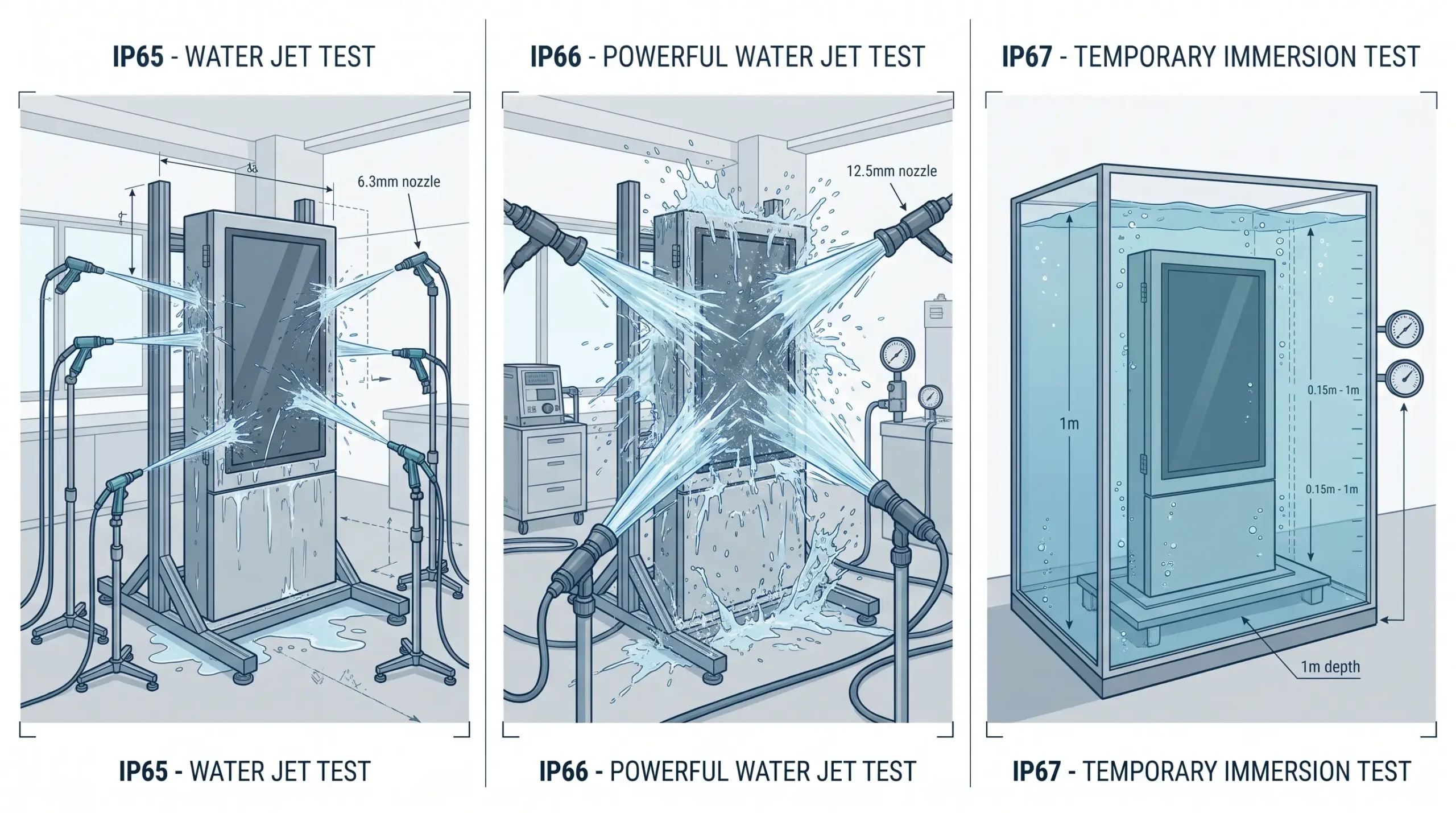
Selecting the correct ingress protection rating for your installation requires a systematic site-first approach. By evaluating the local environment, you ensure your display remains operational regardless of external conditions.
Step 1: Identify the Worst-Case Dust and Water Exposure
Start by assessing the environment’s peak threats. Consider both daily conditions and extreme weather events. If the site is near construction zones or dry, sandy areas, a high dust-tight rating is critical. For water, determine if the display will face simple humidity, seasonal rainfall, or frequent exposure to powerful jets, such as in digital signage for public transportation hubs.
Step 2: Account for Wind-Driven Rain and Display Orientation
Water does not always fall vertically. Wind-driven rain can force moisture into seams that would otherwise remain dry. Evaluate the mounting position; a wall-recessed display is more sheltered than a standalone kiosk. If your display faces prevailing storm directions, prioritize higher water-jet protection ratings to prevent ingress during heavy winds.
Step 3: Review Cleaning Methods and Water Pressure
Maintenance protocols dictate the necessary ingress protection. If staff use high-pressure hoses or pressure washers to clean sidewalks or kiosks near the hardware, your display must handle direct, high-pressure water impact. An IP rating that suffices for rain may fail under the concentrated force of a commercial cleaning hose.
Step 4: Evaluate Public Access and Impact Risk
IP ratings confirm seal integrity, but they do not measure physical durability. In high-traffic areas, physical impact can compromise seals or create entry points for dust and water. Assess whether the installation requires a ruggedized, impact-resistant enclosure to protect the internal components and the screen’s integrity, ensuring long-term hardware reliability.
Step 5: Check Temperature, Sunlight, Condensation and Corrosion
External threats extend beyond moisture and dust. Direct, prolonged sunlight leads to thermal stress, while coastal sites introduce salt-air corrosion. Proper outdoor display thermal management is essential to combat internal heat buildup. Always factor in potential condensation caused by internal and external temperature shifts, which can damage electronics even if the enclosure is perfectly sealed against liquid entry.
Recommended IP Ratings by Digital Signage Application
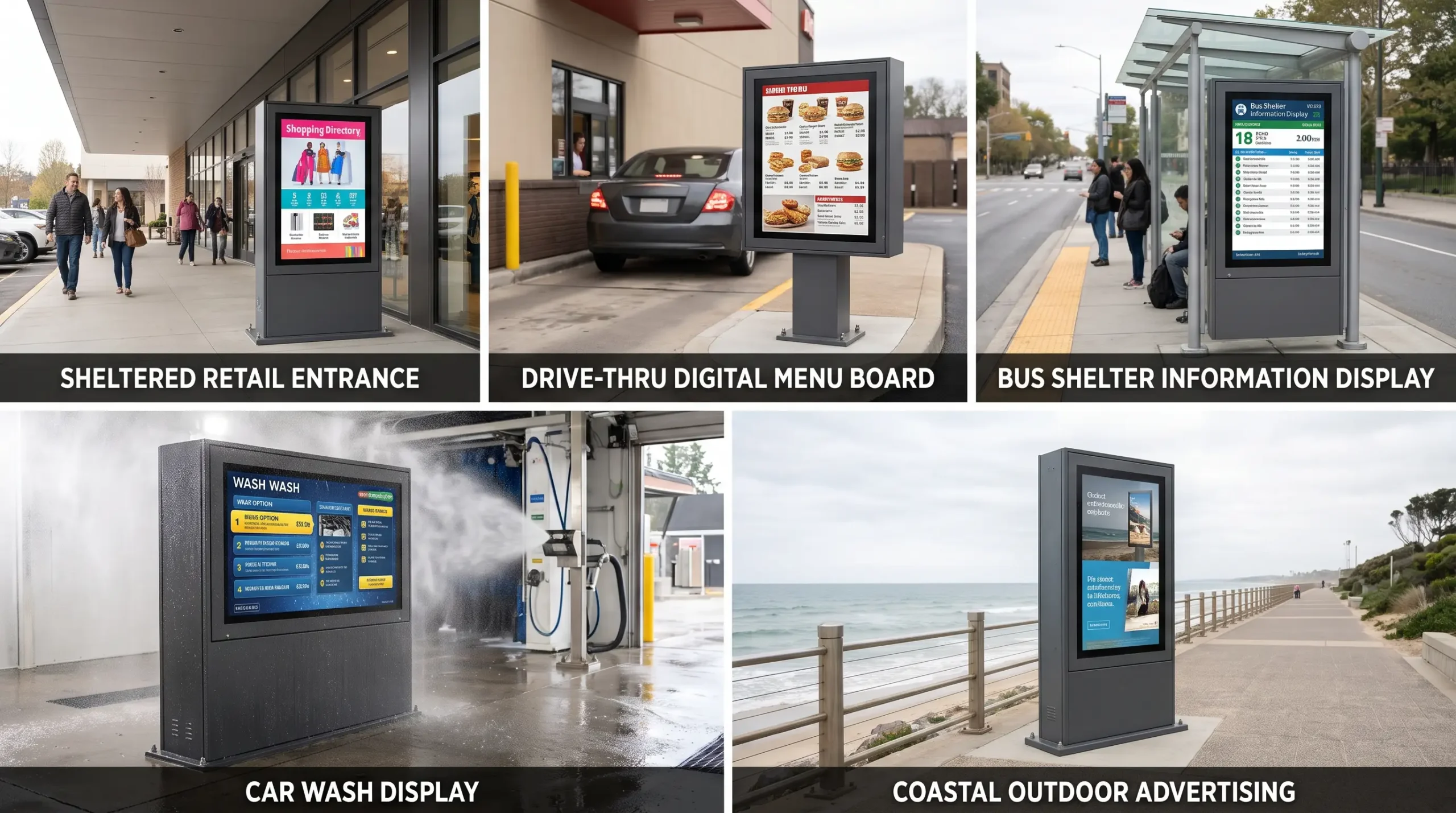
As an LCD digital signage manufacturer, we design screen enclosures around actual deployment environments. Selecting the correct ingress protection level avoids costly water ingress without overpaying for unnecessary engineering. Here is our breakdown of the optimal ingress protection rating across different commercial scenarios.
Indoor Displays Near Entrances and Windows
Screens placed near glass shopfronts or entrance vestibules handle drafts, blowing dust, and high humidity during rainy days, but they do not face direct water spray.
- Recommended Rating: IP20 to IP40 for standard interior walls; IP54 for displays directly inside open sliding doors.
- Core Risk: Dust accumulation over internal electronics and light moisture drafts.
- Deployment Tip: For most storefront corridors, businesses choose indoor free-standing digital displays for retail that pair ambient temperature management with clean front-panel aesthetics.
Covered Patios and Semi-Outdoor Retail Entrances
Semi-covered retail spaces, roofed patio dining areas, and open-sided transit canopies protect hardware from overhead downpours, but wind-blown mist and fine airborne particulate remain constant threats.
- Recommended Rating: IP54 to IP55.
- Protection Profile: Resists airborne dust, splashback, and angled drizzle.
- Hardware Note: Many venues find that deploying semi-outdoor digital signage under awnings delivers reliable moisture protection alongside the higher nit ratings required to fight daylight.
Outdoor Advertising Displays and Street Kiosks
Freestanding outdoor advertising kiosks sit directly in open weather with zero overhead cover. These units experience torrential rains, seasonal snow, and directional wind.
- Recommended Rating: IP65 minimum for the whole enclosure.
- Protection Profile: Fully dust-tight enclosure combined with low-pressure water jet protection from any direction.
- Essential Design: Continuous perimeter compression gaskets and IP-rated cable glands to prevent rainwater creeping through connection access points.
Drive-Thru Digital Menu Boards
Drive-thru digital menu boards endure harsh operational conditions. Beyond severe wind-driven rain, they face daily exhaust fumes, greasy particulate from kitchen vents, and splashes from passing vehicle tires.
- Recommended Rating: IP56 to IP66.
- Protection Profile: Dust protection with resistance against heavy water spray.
- Maintenance Requirement: IP65 or IP66 units allow staff to rinse grease and road film off exterior surfaces without moisture breaking past the display seals.
Bus Stops, Train Stations and Public Information Displays
Passenger information displays in transit hubs face heavy public interaction, environmental debris, and periodic cleaning by maintenance crews.
- Recommended Rating: IP65 (paired with an IK10 impact-resistant front panel).
- Protection Profile: Prevents brake dust from penetrating the chassis while withstanding multi-angle rain.
- Practical Benefit: Keeps electronics sealed against dust while enabling transit operators to pressure-wash boarding platforms safely.
Car Washes and Industrial Wash-Down Areas
Digital displays installed inside or immediately adjacent to car wash bays, food processing plants, or industrial loading docks encounter direct, pressurized chemical and water streams.
- Recommended Rating: IP66.
- Protection Profile: Complete dust-tight construction with high-pressure, powerful water jet resistance.
- Warning: Standard IP65 digital signage seals will deform under high-pressure cleaning nozzles; IP66 provides the reinforced sealing structure required for regular wash-down cycles.
Coastal, High-Humidity and Salt-Air Locations
Oceanfront boardwalks, marinas, and island properties subject displays to persistent salt mist, high humidity, and driving coastal squalls.
- Recommended Rating: IP65 or IP66, backed by C5-M marine-grade corrosion-resistant powder coatings.
- Protection Profile: Tight seals keep salt spray from reaching internal motherboards and power supplies.
- Design Focus: An IP rating only tests water and dust ingress. In marine settings, pair IP65/IP66 sealing with 316 stainless steel fasteners and conformal-coated internal boards to prevent salt air corrosion.
Flood-Prone or Temporary Immersion Locations
Low-lying transit paths, recessed ground-level installations, and floodway access corridors face standing water during severe weather events.
- Recommended Rating: Dual-rated IP66/IP67.
- Protection Profile: IP66 manages wind-driven storm squalls, while IP67 certifies survival against temporary water submersion up to 1 meter for 30 minutes.
- Key Reality: An IP67 rating does not automatically mean a screen handles powerful high-pressure jets, which is why flood-exposed displays need certified testing for both jet spray (IP66) and static submersion (IP67).
The Most Overlooked IP Rating Issue: What Was Actually Tested?
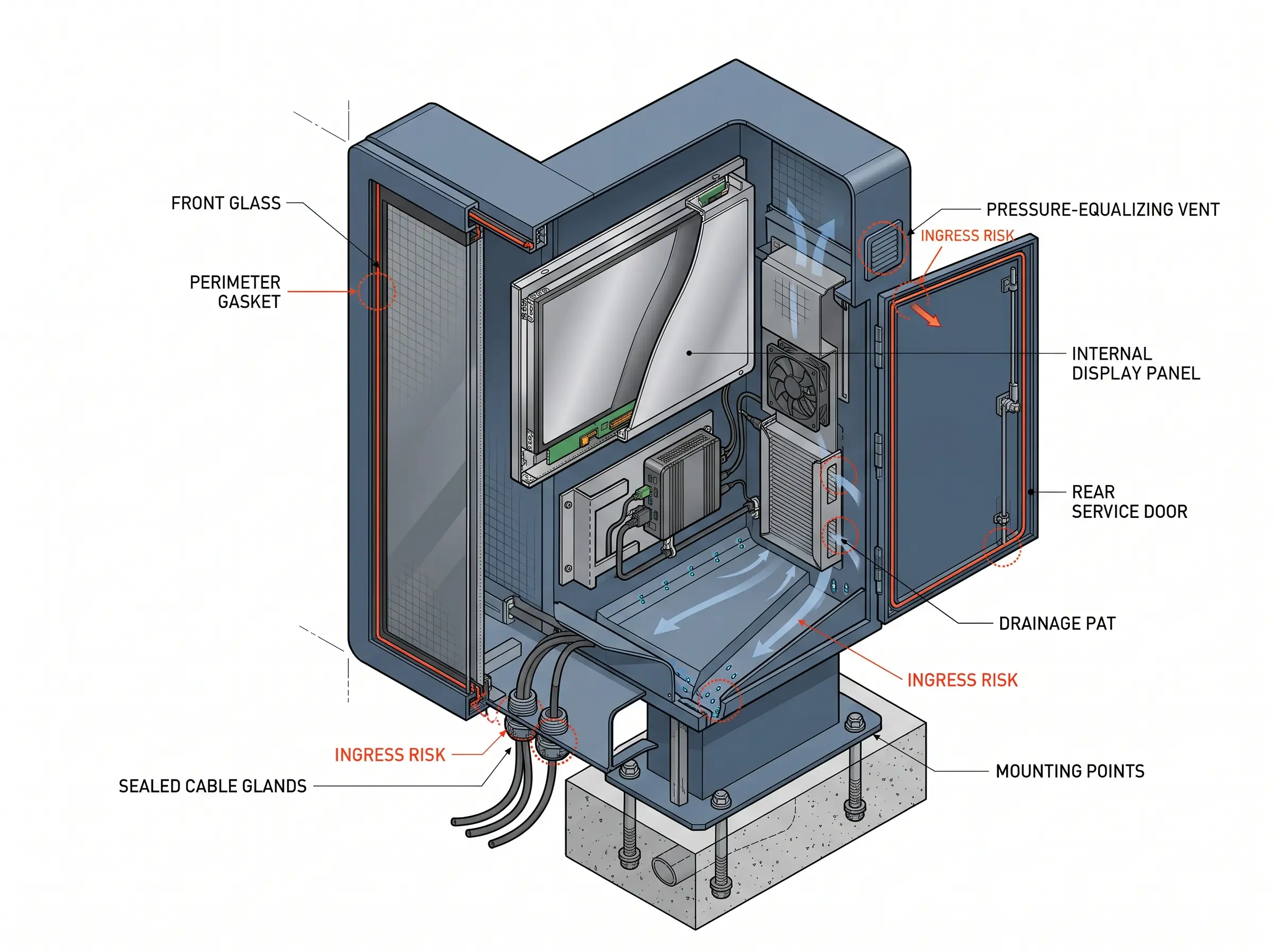
When evaluating an IP rating for digital signage, the biggest mistake buyers make is trusting a test certificate without checking what part of the display was actually evaluated. In our manufacturing facility, we regularly see commercial spec sheets marketing an entire product as “IP65” when only the glass surface meets that standard. A certificate is meaningless if it covers a standalone component rather than the complete, operational hardware deployed in the field.
Front-Panel IP Rating vs Whole-Enclosure IP Rating
There is a massive operational gap between a front panel IP rating and a whole enclosure IP rating:
- Front-Panel Only: The front glass and bezel resist dust and water spray. However, the rear chassis, seams, and interior electronics remain vulnerable. This setup works solely when the screen is embedded flush into a sealed architectural wall or secondary enclosure.
- Whole Enclosure: Every side—front, rear, top, bottom, and access doors—is certified under IEC 60529. True freestanding outdoor screens must feature a comprehensive system seal to survive driving rain and airborne particulates.
If you buy a screen with front-only protection for a freestanding post or pole mount, water will seep into the rear casing during the first major storm.
Why Screen Size and Enclosure Configuration Matter
Never assume an IP rating applies universally across an entire product family. Testing a 43-inch kiosk does not validate a 75-inch or dual-sided version of the same series.
Larger screen sizes experience higher thermal expansion, longer perimeter seams, and more mechanical flex under wind load. A structural design that keeps an ingress protection rating secure on a compact screen can easily warp and pop a seal on a larger chassis. Always demand lab reports for the exact enclosure configuration, especially when reviewing the technical specifications of an outdoor floor-standing kiosk.
How Cable Entries, Doors, Vents and Speakers Affect Protection
Every single opening cut into a chassis degrades its baseline protection unless engineered with precision outdoor display sealing. The most common ingress failure points include:
- Cable entry points: Standard pass-through cutouts leak instantly. Field connections must utilize certified, compression-style IP-rated cable glands matched to specific cable diameters.
- Service access doors: Hinged access panels require continuous, non-spliced perimeter gaskets with uniform latch compression. Uneven screw torque leads straight to fluid ingress.
- Acoustic cutouts and ventilation: Open speaker grilles compromise your rating unless backed by hydrophobic acoustic membranes that pass sound while blocking liquid penetration.
Why Installation Orientation Must Match the Tested Configuration
Ingress testing laboratories evaluate equipment in a specific physical orientation. Most enclosures rely on gravity-assisted drainage channels, sloped rooflines, and downward-facing gasket lips to shed water runoff before it challenges a seal.
If you take a display tested and certified for portrait operation and mount it horizontally in landscape—or tilt it upward toward the sky—the internal drainage paths reverse. Water will pool against seams that were never designed for standing liquid, leading to seal failure under ordinary rainfall. Understanding how weatherproof outdoor dual-sided kiosks and landscape totems handle runoff determines whether your deployment survives long-term.
How On-Site Modifications Can Compromise an IP Rating
Field modifications destroy factory ingress protection faster than extreme weather. The most frequent errors made during deployment include:
- Drilling mounting or wiring holes: Piercing the chassis outside the factory-designed mounting points creates unsealed entry paths directly into sensitive boards.
- Misaligned gasket seating: Technicians who fail to seat door gaskets flush when closing service compartments leave pinched seals that invite moisture.
- Over-tightening or under-tightening glands: Compressing a gland too far strips the rubber core, while leaving it loose allows water to track along the cable sheath right into the electronics bay.
What an IP Rating Does Not Protect Your Digital Signage Against
While an Ingress Protection (IP) rating is a vital metric for assessing how well your outdoor digital signage keeps out dust and water, it is not a catch-all indicator of durability. Many buyers mistakenly assume that a high IP score equates to a “bulletproof” display, but there are critical environmental factors that fall outside the scope of IEC 60529 testing.
Heat, Cold and Solar Loading
An IP-rated enclosure is designed to be sealed, which can inadvertently create a thermal trap. An IP rating does not verify the display’s ability to manage internal temperatures. Without advanced outdoor digital signage thermal management, the screen may suffer from overheating in direct sunlight (solar loading) or freezing in low-temperature environments, regardless of its water-tight integrity.
Internal Condensation and Pressure Changes
Sealing a unit against moisture does not stop the natural physical process of condensation. As temperatures fluctuate, the air inside an enclosure can expand and contract, causing internal pressure shifts. If the housing is not designed with specific vents or pressure-equalization systems, moisture can form on the internal electronics, potentially leading to failure even in an otherwise “sealed” display.
UV Degradation and Direct Sunlight
IP ratings measure ingress, not material longevity. Prolonged exposure to intense UV radiation can cause plastic components, seals, and exterior coatings to become brittle or discolored over time. A display might maintain its IP65 status while its external casing degrades, fades, or loses structural integrity due to solar exposure.
Salt Mist, Chemicals and Corrosion
If you are installing coastal digital signage, note that an IP rating does not certify resistance to salt spray or chemical corrosion. Corrosion can compromise the hardware and electrical connections long before liquid ingress becomes an issue. You must specify additional treatments, such as powder-coated marine-grade steel or stainless steel, to prevent oxidation.
Vandalism and Mechanical Impact
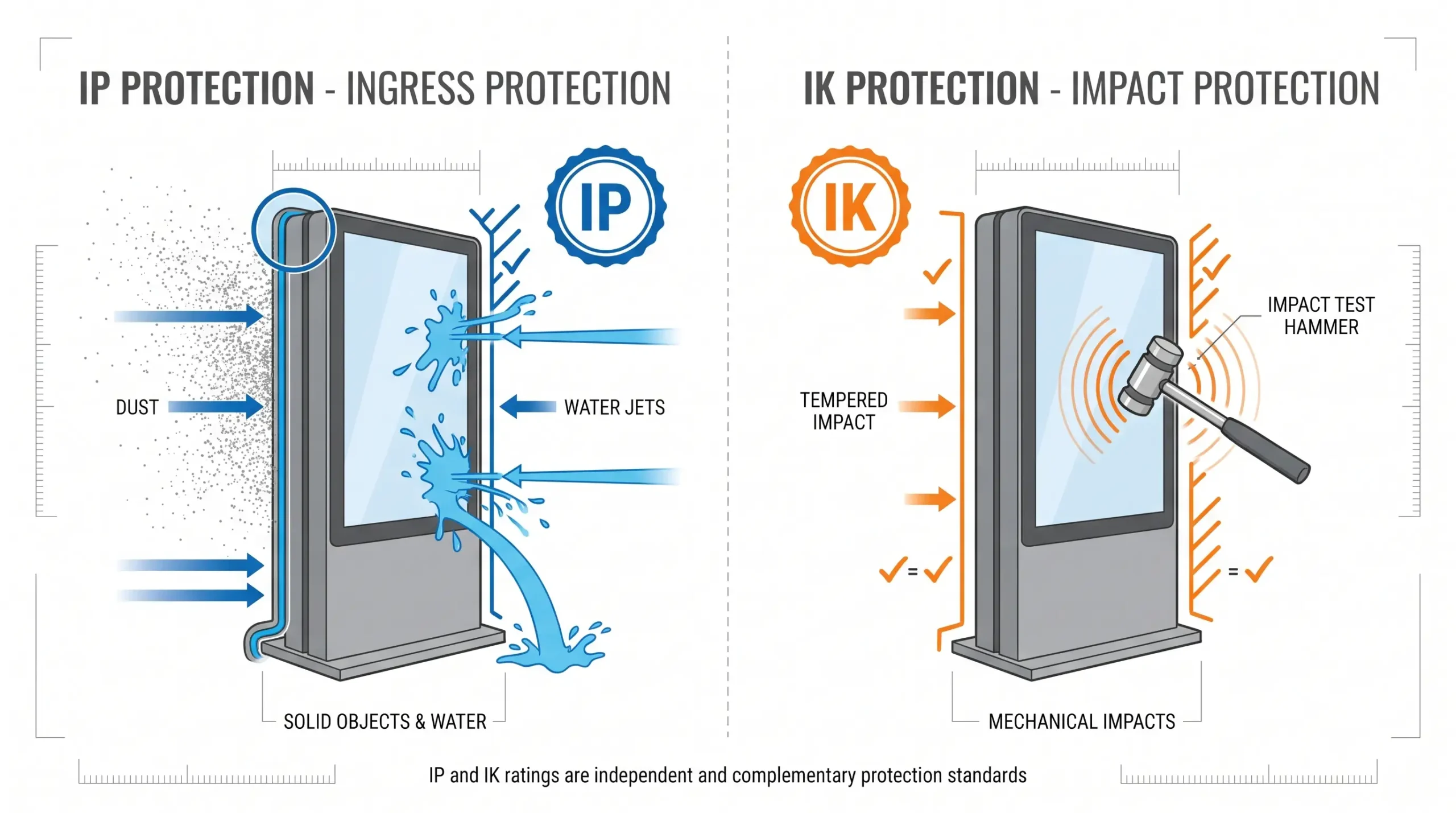
Ingress protection is strictly about fluids and solids—it does not account for force. An IP-rated display is not inherently vandal-resistant. If your installation is in a high-traffic public space, you must look for an IK10 impact rating alongside your IP requirement to ensure the glass and enclosure can withstand physical strikes or attempted forced entry.
IP Rating vs IK Rating for Outdoor Digital Signage
What IK Ratings Measure
While IP ratings focus on moisture and dust, the IK rating measures the level of protection against mechanical impact. Defined by the EN 62262 standard, IK ratings range from IK00 (no protection) to IK10 (protection against 20 joules of impact energy, equivalent to a 5kg mass dropped from 400mm).
When an Outdoor Display Needs IK10 Protection
Any installation in a public space, transit hub, or high-traffic street corner should prioritize an IK10 impact rating. For example, our outdoor bus station displays are engineered with IK10-rated glass to withstand accidental bumps or intentional vandalism in high-risk areas.
Why IK10 Glass Does Not Guarantee the Whole Display Is Impact-Resistant
An IK10 glass surface only protects the screen itself. The housing, frame, and internal components must also be built to absorb or deflect shock. A display with high-strength glass may still fail if the mounting points or the metal enclosure are not reinforced to handle the same 20-joule impact.
How to Combine IP and IK Requirements in One Specification
To ensure your outdoor digital signage is both durable and weather-resistant, always specify both ratings in your procurement documentation.
| Requirement | Focus | Standard |
|---|---|---|
| IP Rating | Dust, rain, and water ingress | IEC 60529 |
| IK Rating | Vandalism and mechanical shock | EN 62262 |
When selecting hardware, look for integrated solutions like our IK10-rated bus stands that combine structural toughness with precise environmental sealing. Defining both allows you to create a secure, long-lasting installation that survives both the elements and the public.
Outdoor Enclosure or Native Outdoor Display: Which Is Better?
Choosing between an external protective cabinet and an all-in-one unit directly impacts your long-term operating costs and reliability. As a manufacturer of LCD digital signage, we see many buyers struggle to balance upfront savings against true environmental protection. Understanding how each approach handles the real-world IP rating for digital signage helps you make the right choice for your site.
Using an Indoor Commercial Screen Inside an IP-Rated Enclosure
Housing a standard indoor commercial display inside a third-party protective case seems like a budget-friendly move. You get an off-the-shelf screen protected by an external shell designed to meet dust and water ingress standards.
However, this retrofitted configuration introduces specific operational hurdles: Thermal bottlenecks: Indoor screens cannot handle direct solar radiation. The external housing must handle all internal heat dissipation, often requiring add-on fans or active air conditioning that increase failure points. Optical reflection: Placing a screen behind an extra layer of protective glass creates internal reflections and glare, drastically reducing visibility under daylight. Bulk and footprint: External housings are bulky, heavy, and require complex structural mounting to remain safe in high-wind conditions.
Advantages of a Purpose-Built Outdoor Digital Signage Display
A purpose-built outdoor LCD display is engineered from the ground up for harsh outdoor environments. Every gasket, port, circuit board, and optical layer is designed as a unified system to maintain a certified ingress protection rating.
Opting for an integrated design delivers distinct operational benefits: Factory-sealed durability: The entire chassis is engineered to achieve a verified whole enclosure IP rating without secondary outer shells. Direct optical bonding: Eliminating the air gap between the protective glass and the LCD panel stops internal condensation and reflection completely. Optimized footprint: Sleek profiles allow seamless integration into bus shelters, drive-thrus, and storefronts. Exploring dedicated outdoor digital signage advantages highlights how integrated engineering streamlines deployment and site aesthetics.
Comparing Brightness, Cooling, Maintenance and Replacement Costs
Evaluating lifecycle costs reveals that initial hardware savings often disappear within the first two years of operation.
| Feature / Factor | Indoor Screen + IP Enclosure | Native Outdoor LCD Display |
|---|---|---|
| Typical Brightness | 350 to 700 nits (washes out in sun) | 2,000 to 3,500+ nits (sunlight readable) |
| Thermal System | Add-on fans, air filters, or external AC | Integrated closed-loop or direct air cooling |
| Filter Cleaning | Frequent; clogged filters cause overheat | Minimal or filter-free closed-loop cooling |
| Failure Risks | Black-screen thermal shutdown (isotropic failure) | High-temperature industrial panels resist solar clearing |
| Total Cost of Ownership | Lower day-one hardware cost; higher field service expenses | Lower operational overhead, fewer truck rolls, longer lifecycle |
Modern designs, such as a maintenance-free outdoor wall-mounted digital signage unit, eliminate consumable air filters altogether, cutting routine field service costs significantly.
Why the Complete Installed System Determines the Final Protection Level
A protective enclosure or native screen is only as resilient as its final installation on site. A display certified to IP65 or IP66 in a test chamber will fail in the field if cable routing, service access doors, and mounting penetrations are not handled correctly.
The complete installed system dictates your field reliability. Unsealed power conduits, overtightened door gaskets that warp under torque, and poorly positioned ventilation exhausts can introduce water ingress during driving rain or high-pressure cleaning. Always ensure mounting practices preserve the integrity of every seal across the entire operating footprint.
How to Verify a Manufacturer’s IP Rating Claim
When investing in outdoor digital signage, you must look beyond marketing claims. Verifying the ingress protection rating ensures your hardware can withstand the intended environment.
Request the Test Report for the Exact Model and Screen Size
Always ask for the official ingress protection testing report. Ensure the documentation specifically references the exact model and screen size you are purchasing, as performance can vary significantly between different configurations.
Confirm the IEC 60529 Test Method and Standard Edition
Ensure the testing adheres to the IEC 60529 standard. Check that the report references a current edition of the standard to confirm the procedures are up to date.
Check Whether the Complete Assembled Display Was Tested
A common industry pitfall is testing only a component rather than the finished unit. Verify that the IP certification report covers the entire assembled display, including all integrated fans, filters, and screens.
Verify the Testing Laboratory and Certification Scope
Confirm that the test was conducted by an accredited, independent third-party laboratory. This provides unbiased validation of the display’s weather protection capabilities.
Review Gaskets, Cable Glands and Seal Maintenance Requirements
An IP-rated display relies on physical seals. Request the maintenance manual to understand the required care for gaskets and cable glands to maintain the rating over time.
| Verification Step | Why It Matters |
|---|---|
| Model Specificity | Prevents assumptions based on smaller, easier-to-seal units. |
| Complete System Test | Ensures the cooling system and seams don’t bypass the rating. |
| Accredited Lab | Guarantees the test was performed to rigorous standards. |
| Maintenance Docs | Defines the operational effort needed to keep the display protected. |
By following this due diligence, you ensure your outdoor LCD display is equipped to handle real-world conditions.
Digital Signage IP Rating Procurement Checklist
When sourcing display solutions, a structured approach ensures your hardware matches the environmental demands of your specific digital signage installation. Use this checklist to verify that your chosen display provides the necessary protection for long-term reliability.
Define the Installation Environment Before Selecting a Rating
Before evaluating specs, document the specific site conditions. Consider dust exposure, potential for water ingress from rain or cleaning, and proximity to public traffic. Understanding these factors prevents over-specifying or under-protecting your asset.
Specify IP, IK, Operating Temperature and Brightness Separately
An IP rating only covers ingress. You must independently define: IP Rating: Resistance to solids and water. IK Rating: Vandal resistance for public spaces. Operating Temperature: Range for internal fans/heaters. Brightness: Required nits for ambient light conditions.
Include Corrosion and Condensation Requirements Where Necessary
For coastal or high-humidity installations, an IP rating alone is insufficient. Specify requirements for salt-mist resistance and internal condensation management systems to ensure the display remains operational in harsh, fluctuating climates.
Require Evidence for the Exact Product Configuration
Never rely on general product data. Always request the official test report for the specific model and screen size you are purchasing. Ensure the report confirms that the testing was performed on a fully assembled unit, including all cable glands and seals.
Plan for Inspection and Seal Maintenance After Installation
Environmental protection relies on the integrity of gaskets and seals. Incorporate a routine maintenance schedule into your project plan to inspect these components. Regular checks prevent performance degradation and ensure the digital signage continues to meet its certified ingress standards throughout its service life.
| Procurement Step | Focus Area |
|---|---|
| Assessment | Site-specific dust and water risks |
| Verification | Official test reports for exact model |
| Specification | IP, IK, thermal, and corrosion data |
| Lifecycle | Routine seal and gasket inspection |
Common Mistakes When Choosing an IP-Rated Digital Signage Display
Selecting the right hardware for your environment is critical, yet many buyers fall into traps that compromise their investment. As a manufacturer of LCD digital signage, I see these common errors frequently during the procurement process.
Assuming Waterproof Means the Display Can Be Submerged
An IP rating does not automatically equal “waterproof.” Most outdoor digital signage IP ratings, such as IP65 or IP66, are designed for water jets and rain, not submersion. Unless specifically rated for IP67 or higher, your display will fail if installed in a flood-prone area or standing water.
Choosing the Highest Number Without Reviewing the Water Test
Buyers often assume a higher number is always better, leading to over-specifying. A higher IP rating often introduces complex seals that may impact thermal management. Always review the test report to ensure the protection level matches your specific environmental needs rather than just picking the highest digit on the chart.
Ignoring Cable Entries and Installation Modifications
The ingress protection rating applies to the factory-sealed unit. If installers drill holes for power or data cables without using proper IP-rated cable glands, the rating is immediately voided. The entire system—including cable entry points—must maintain the integrity of the enclosure.
Using IP Rating as Proof of Corrosion or Heat Resistance
An IP rating covers dust and water only. It does not certify that your display can handle high ambient temperatures, direct solar loading, or salt-mist corrosion. Ensure you evaluate the ultra-thin free-standing digital signage or outdoor unit for specific thermal and material specs separately from its IP rating.
Accepting a Certificate From a Different Model or Screen Size
Never accept a certificate for a generic product line or a different size. Every configuration, including the glass and internal components, changes how an enclosure performs under pressure. Always request test reports for the exact model and size you are purchasing.
| Common Mistake | Potential Consequence |
|---|---|
| Assuming Submersibility | Internal short circuits and total unit failure. |
| Over-specifying IP Rating | Unnecessary costs and potential cooling issues. |
| Improper Cable Entry | Moisture ingress despite a high-rated housing. |
| Ignoring Corrosion Specs | Rapid degradation in coastal or chemical-heavy areas. |
| Generic Certification | False security that leads to hardware failure. |
By avoiding these pitfalls, you ensure your outdoor digital signage IP rating aligns perfectly with your site’s physical requirements, protecting your hardware for years to come.
Frequently Asked Questions About Digital Signage IP Ratings
Is IP65 Good Enough for Outdoor Digital Signage?
IP65 is often the industry standard for outdoor digital signage, providing complete protection against dust and resistance to water jets. It is typically sufficient for environments exposed to rain, provided the display is not located in areas subject to flooding or extremely high-pressure cleaning.
Is IP66 Completely Waterproof?
IP66 is rated for protection against powerful water jets from any direction. While highly weather-resistant, “waterproof” is a broad term. IP66 does not mean the device can be submerged in water; it signifies the enclosure is sealed against heavy rain and direct spray.
Is IP67 Better Than IP65 or IP66?
IP67 offers protection against temporary immersion in water. While the number is higher, it is not “better” for every application. Many outdoor kiosks operate perfectly with IP65 or IP66 ratings. Choosing IP67 is only necessary if your specific installation site carries a risk of standing water or flooding.
Can an IP54 Display Be Used Outdoors?
An IP54 display is generally limited to sheltered or semi-outdoor environments, such as covered patios or store entrances. It offers protection against splashing water and limited dust, but it is not built to withstand direct exposure to wind-driven rain or harsh outdoor elements.
Does IP65 Protect a Display Against Salt Water?
No. An IP rating only defines the level of ingress protection against solid objects and water. Salt air and salt water are corrosive agents. Even an IP65 or IP66-rated display requires additional protective coatings or corrosion-resistant materials to survive in coastal environments.
Does an Outdoor Digital Signage Display Also Need IK10?
Yes, if the display is in a public area, an IK10 impact rating is recommended. While an IP rating protects against environmental moisture and dust, an IK rating confirms the screen is protected against mechanical impact, such as vandalism or accidental hits.
Can Drilling a Cable Hole Invalidate an IP Rating?
Any unauthorized modification, including drilling, voids the original IP certification. Proper cable management must use specialized, IP-rated cable glands to maintain the integrity of the enclosure’s seal.
How Often Should IP-Rated Seals and Gaskets Be Inspected?
Gaskets and seals should be inspected at least every six to twelve months. Over time, environmental factors can cause seals to harden or shrink, which degrades the ingress protection. Regular maintenance ensures your display remains protected against the elements throughout its operational lifespan.
Final Recommendation: Choose Protection for the Installation, Not the Highest Number
Match the IP Rating to the Actual Dust, Water and Cleaning Risks
When selecting an outdoor digital signage IP rating, avoid the temptation to over-specify. Selecting the highest possible rating can unnecessarily increase costs if your environment does not require it. Instead, conduct a site audit to identify the genuine threats.
| Environment Type | Typical Dust/Water Risk | Recommended IP Range |
|---|---|---|
| Sheltered Entryway | Light splashing | IP54 |
| Street-side Kiosk | Wind-driven rain | IP55–IP65 |
| Industrial/Wash-down | High-pressure cleaning | IP66 |
Evaluate the Display as a Complete Outdoor System
Never assume a component-level rating applies to the entire unit. When we deploy an outdoor digital signage display, we look at the whole enclosure, including cable glands, ventilation, and access doors. A screen is only as weather-resistant as its weakest seal. Always verify how the manufacturer integrates cooling systems with the protective chassis to ensure that thermal management does not compromise ingress protection.
Verify Test Evidence Before Approving the Product
Always demand proof before finalizing a purchase. A legitimate outdoor LCD display manufacturer will provide an official IEC 60529 test report. Ensure this report covers: The exact model and screen size you are ordering. The specific testing configuration (e.g., vertical mounting vs. tilted). Certification from an accredited third-party laboratory.
By focusing on verified data rather than marketing claims, you ensure long-term reliability and protect your investment from environmental failure.