☀
Fully Exposed Outdoor
Review sunlight, climate, rain, dust, drainage, cable entry, wind, foundation and local approval.


Plan configurable LCD display hardware for city streets, civic plazas, parks, public-service locations, transit forecourts, visitor information and urban DOOH positions.
Uniview LCD supplies configurable display, kiosk and enclosure hardware. CMS licences, city-data platforms, programmatic DOOH, passenger-information systems, emergency-message authority, civil works, permits and project integration remain separate unless explicitly included and technically confirmed.
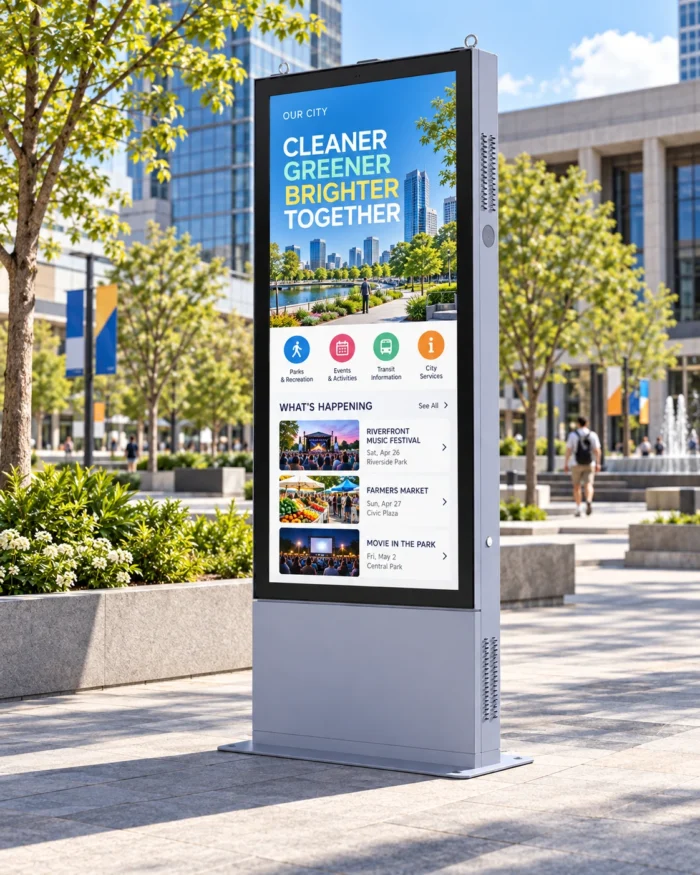
Start with the public task and installation position. A pedestrian street, civic square, park map, transport forecourt and DOOH location should not inherit one display specification.
The images on this page are product or application references from Uniview LCD. They are not presented as verified customer results or performance evidence.
Street displays may support public information, local maps, event notices or compatible advertising content. Start with the approach direction, viewing distance, dwell time and whether the position is fully exposed, sheltered or close to a building facade.
Map the public task to a hardware starting point, then confirm exposure, structure, content source and responsibility.
| Public-space zone | Typical task | Hardware starting point | Primary project question |
|---|---|---|---|
| City street | Information, orientation or DOOH | Outdoor floor-standing or wall display | Approach distance, sunlight, foundation and service access |
| Civic plaza | Notices, events and public messages | Single- or double-sided display | Crowd flow, wind, drainage and content authority |
| Park | Maps, attractions and safety information | Information totem or interactive kiosk | Decision point, accessibility and map ownership |
| Public-service point | Service notices, queues or compatible data | Wall display or configured kiosk | Data source, interaction and system owner |
| Transit forecourt | Orientation and public information | Outdoor totem or shelter display | Boundary between public realm and transport operations |
| Urban DOOH | Advertising and sponsor messages | Configured outdoor advertising display | Hardware scope versus media platform and campaign operations |
“Outdoor” does not describe one site condition. Record the actual exposure, viewer, structure and service route before a display platform is proposed.
Review sunlight, climate, rain, dust, drainage, cable entry, wind, foundation and local approval.
Review wind-driven moisture, reflected light, humidity, condensation, public contact and the limit of canopy protection.
Review viewing direction, light level, glass, reflection, solar heat, airflow and content readability.
Review arrival sightlines, queue layout, mounting, accessibility, operating schedule and content source.
Review public contact, tamper risk, accessible reach, safe clearances, cleaning and maintenance ownership.
These are planning directions. Final size, brightness, touch, protection, thermal method, player, operating system and interfaces depend on the selected platform and approved configuration.
For streets, plazas, parks and civic approaches. Review sunlight, weather, thermal method, cable entry, foundation and service access.
Explore outdoor displaysFor maps, notices and orientation where a vertical information surface fits pedestrian sightlines and circulation.
Explore floor-standing displaysFor compatible maps and public-information applications. Review touch, accessible reach, player, OS, interfaces and database ownership.
Explore kiosk hardwareFor facades, sheltered service points and selected transport-edge locations where the support structure and service route are confirmed.
Compare outdoor formatsFor pedestrian routes and open public areas with viewers approaching from more than one direction. Confirm stability and service clearance.
Review outdoor display hardwareFor close-view urban advertising and public messaging. The display hardware does not include media inventory, ad serving or campaign operations.
Review an outdoor advertising displayThe display decision follows a connected chain of public-space conditions. Each item should be documented for the proposed site rather than converted into a universal product claim.
Confirm viewing distance, direction, dwell time, daylight, reflection and content density.
Record temperature range, solar exposure, shade, reflected heat and operating schedule.
Review rain, dust, condensation, cable entry, ground water and cleaning method.
Define wind, foundation, fixing points, public clearances and applicable local review.
Confirm supply, protection, network, player, signal path and remote-access policy.
Define access, cleaning, inspection, spare parts, fault reporting and maintenance owner.
Separate the visible display from the applications, data, media operations and public infrastructure behind it. This prevents a hardware quotation from being mistaken for a complete smart-city or DOOH service.
Commercial LCD, quoted touch layer, enclosure, mounting direction and documented environmental or appearance options.
Computing, physical interfaces and selected peripheral hardware only when listed in the approved configuration.
Applications, databases, real-time feeds, ad serving, campaign reporting, user accounts, hosting, cybersecurity and ongoing software support.
Scope boundary: A display may present a compatible external-system output, but compatibility does not mean the CMS, city-data platform, passenger-information system, programmatic DOOH service, network integration or campaign operation is included.
Urban public-space planning may cover the streets, squares, bus shelters and interchange areas around transport facilities. Operational station systems require a dedicated transportation scope.
Outdoor display position, visibility, shelter, foundation, service access and compatible public-information input.
Passenger-information logic, real-time feeds, operational alerts, station networks and the responsible transport authority.
Confirm signal source, player, data owner, update method, cybersecurity boundary and acceptance test before hardware approval.
Review transportation display planningThe approved configuration should follow the public task, site environment, structure, content source and responsibility boundary—not a screen-size choice made in isolation.
Information, orientation, service, event, safety or advertising content.
Approach direction, viewing distance, pedestrian flow, stopping area and accessible reach.
Indoor, covered, exposed, near glass, high footfall, public contact and climate.
Wall, base, foundation, wind, drainage, power, data and service clearances.
CMS, city data, ad server, player, OS, signals, touch and compatible peripherals.
Permits, documents, acceptance, installation, maintenance and system owners.
Protection ratings, certifications, operating conditions and warranty terms must be confirmed against the selected model, configuration, target market and supporting documentation.
Suitability claims should be tied to the exact model, public-space position, configuration and available supporting records.
Identify the base platform, panel, brightness, electronics, enclosure, touch, interfaces and optional modules.
Define exposure, viewing conditions, structure, utilities, content source, installation and maintenance ownership.
Confirm which drawings, reports, ratings, certifications, inspection records and warranty terms apply to the proposed configuration.
Review quality evaluationA clearer public-space brief reduces assumptions and helps engineering compare suitable display platforms.
Public-space type, audience and display task
Installation country and destination market
Site photos, drawings and available dimensions
Indoor, covered or fully exposed position
Viewing distance, pedestrian flow and stopping area
Power, network, player and content source
Touch, sensors, peripherals and system interfaces
Quantity, expected schedule and required documents
Define the viewer, content task, public route and responsible project team.
Confirm distance, daylight, weather, structure, utilities and service access.
Compare wall, floor, single-sided, double-sided and interactive options.
Document the CMS, city data, PIS, ad server, network and integration owners.
Review the proposed configuration, inclusions, documents and open items.
Confirm the evaluation, acceptance and production arrangements.
Use live first-party resources for outdoor display formats, kiosk planning, software boundaries, quality evidence and customization.
Compare outdoor LCD formats and the site conditions that affect visibility, enclosure, thermal method and installation.
Explore outdoor displaysReview kiosk form, interaction, player, interfaces, peripherals, accessibility and application ownership.
Explore kiosk hardwareReview one outdoor advertising-display direction without assuming that its configuration applies to every site.
Review the F130L pageSeparate the display, player and content-management layers before assigning scheduling and software support.
Read the CMS guideReview enclosure, appearance, brightness, touch, interfaces, electronics, thermal method, mounting and peripheral options.
Review OEM/ODM scopeDisplay hardware presents content at the site. A DOOH platform may manage media inventory, scheduling, proof-of-play, campaign delivery, audience data and reporting. Those platform functions should not be assumed from a display-hardware quotation.
Review the actual light direction and level, viewing distance, glass, reflection, solar load, climate, content design and operating schedule. Brightness and thermal requirements must be confirmed for the selected model and configuration.
The required protection depends on rain, dust, wind-driven moisture, public contact, cleaning, cable entry and local project rules. Confirm the applicable rating and supporting document for the exact quoted configuration rather than assuming one rating for every product.
Compatibility must be checked against the selected player, operating system, interfaces, network policy, content format and acceptance method. A compatible hardware path does not mean the CMS licence, hosting or ongoing software support is included.
A compatible signal or computing configuration may be reviewed after the data source, interface, protocol, security boundary and integration owner are defined. City platforms, PIS, APIs, databases and real-time feeds remain separate unless explicitly contracted.
The project should assign responsibility for structural calculations, foundations, drainage, power, network, lifting, permits, installation, inspection and site restoration. Only items listed in the approved quotation are included.
Selected configurations may support touch and compatible peripherals after the environment, accessibility, interface, power, enclosure and software requirements are confirmed. No peripheral or workflow should be assumed unless it appears in the approved configuration.
A drawing, configuration review, sample or prototype route can be discussed after the site and system requirements are defined. The available route depends on the platform, customization scope, quantity and approval plan.
Lead time is confirmed after the display platform, enclosure, electronics, interfaces, optional modules, quantity, destination requirements and approval process are frozen. No fixed lead time should be inferred before that review.
Do not assume global on-site survey coverage. Share site photos, drawings, dimensions, exposure and installation information first; the available review method and any local support must be confirmed for the specific project and location.
Share the site position, photos, drawings, viewing conditions, exposure, structure, utilities, content source, software boundary, destination market and quantity. Uniview LCD can review a hardware direction and identify the items requiring further confirmation.