


Outdoor digital signage uses electronic displays specified for exterior conditions to show advertising, menus, directions or public information. For system integrators and distributors, selecting a system means matching the display and enclosure to the site, then agreeing how content, installation and maintenance will work.
Start with the installation location, sunlight exposure and required content. Use those details to shortlist outdoor digital signage configurations before comparing prices or committing to a rollout.
What makes a display suitable for outdoor use?
An outdoor display needs documented suitability for the light, weather and temperature conditions at its installation point. Brightness, enclosure protection and thermal management must be assessed together, with the mounting arrangement included in the review.
A product photo or an “outdoor” label does not prove environmental readiness. Request the proposed configuration, installation instructions and supporting test documents, and verify which components and operating conditions they cover.
Is a window-facing display the same as an outdoor display?
A window-facing display normally sits inside a building and presents content through storefront glass; an outdoor display is exposed to exterior conditions. Both applications need a review of daylight and reflections, while their enclosure requirements differ significantly.
If the equipment will remain indoors, compare window digital signage before specifying a full outdoor enclosure. Record the temperature and sunlight conditions behind the glass as part of that decision.
Should you choose LCD or direct-view LED?
Evaluate LCD and direct-view LED using the required image size, viewing distance, content detail and service arrangement. For a large display surface, include direct-view LED in the comparison; for a kiosk or individual information screen, include an enclosed LCD configuration.
An LCD with an LED backlight is still an LCD display. Uniview’s V130L outdoor wall mounted digital display uses that construction, so compare its specifications within the correct technology category.
How do you specify screen size and sunlight readability?
Choose screen size and readability requirements from the audience’s actual viewing position and the content they need to read. A short promotion, a detailed menu and a directory require different checks even at the same site.
Photograph the proposed location at different times of day. Record viewing distance, approach direction, obstructions and periods of direct sun, then review the shortlist using representative content.
How many nits does outdoor digital signage need?
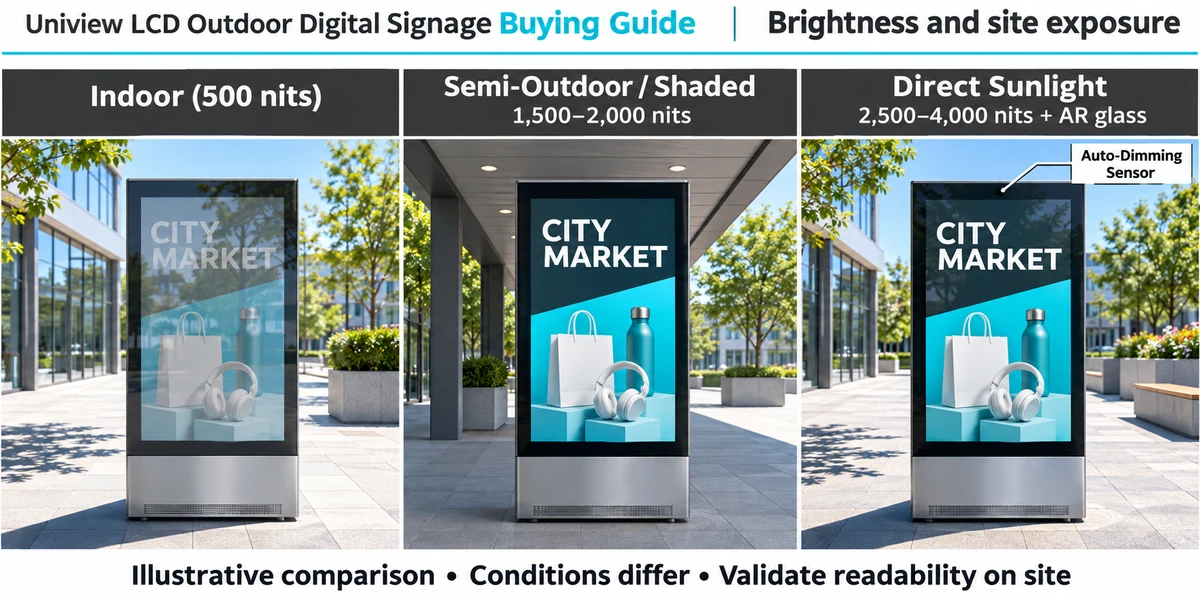
As a general industry baseline, shaded or semi-outdoor locations typically require 1,500 to 2,000 nits, while installations exposed to direct sunlight usually start at 2,500 nits and scale up to 3,500–4,000 nits depending on screen orientation and glare. Treat these figures as a starting point, then validate readability using the proposed display, front glass and actual content.
Ask whether the quoted value describes the bare LCD panel or the assembled display, as protective cover glass can reduce measured brightness unless paired with anti-reflective (AR) coating. Also confirm whether the figure is typical or peak brightness, and verify that an ambient light sensor is included for automatic nighttime dimming to avoid local glare complaints.
What should the readability test include?
Test text, prices, maps and other essential details from the intended viewing distance, including off-axis positions. Check the effect of reflections, cover glass and polarized sunglasses where relevant to the audience.
Use the customer’s actual content during the test. Record the brightness setting and light conditions alongside photographs so the team can compare results, explain compromises and repeat the check after installation.
Which environmental requirements should you verify?
Verify ingress protection, thermal conditions and exposure to corrosion or impact for the proposed assembly. A shaded entrance and an unshaded street installation should each receive an engineering review, even when the starting model is the same.
What do IP55 and IP65 tell a buyer?
IP55 indicates dust-protected construction and protection against low-pressure water jets; IP65 indicates dust-tight construction with the same water-jet protection category. Eaton’s enclosure-rating tables explain these solid-ingress and water-ingress digits.
In outdoor signage enclosures, IP55 is commonly associated with fan-cooled designs that use filtered air vents, while IP65 typically applies to sealed enclosures using air conditioning or heat exchangers. For public street-level installations, integrators also commonly pair the IP rating with an IK10 impact-resistance specification for the front laminated glass.
Always ask which complete assembly was assessed, including service doors and cable entries. Because IP codes do not measure corrosion, condensation or temperature extremes, review those environmental factors separately and agree on cleaning methods before handover.
How should you evaluate cooling in direct sunlight?
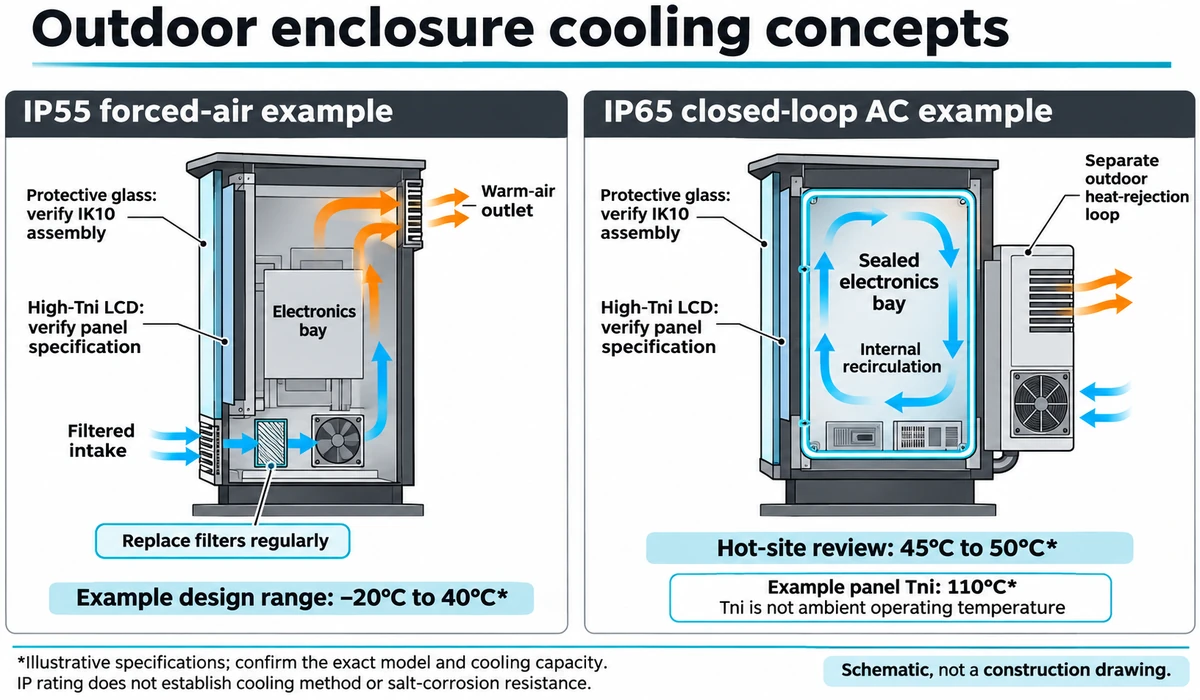
Match the thermal architecture to the site’s ambient temperature range, solar load and air quality:
Ask the supplier to explain the proposed thermal configuration, required mounting clearances and relevant test conditions. For demanding sites, verify during sample testing whether sustained heat triggers dark patches, automatic thermal dimming or shutdowns before approving the configuration for volume orders.
What changes in cold, humid or coastal locations?
Cold, humidity and salt exposure require separate questions during specification. Ask about cold-start heaters, condensation control, corrosion-resistant enclosure coatings (such as galvanized steel or marine-grade finishes) and maintenance intervals for the proposed location.
Confirm which protective measures are included in the quotation, and keep any open environmental items visible in the technical approval record.
Which installation format fits the project?
Choose the format by the available structure, audience approach and maintenance access. Confirm the display arrangement on a site drawing before requesting the final enclosure and mounting proposal.
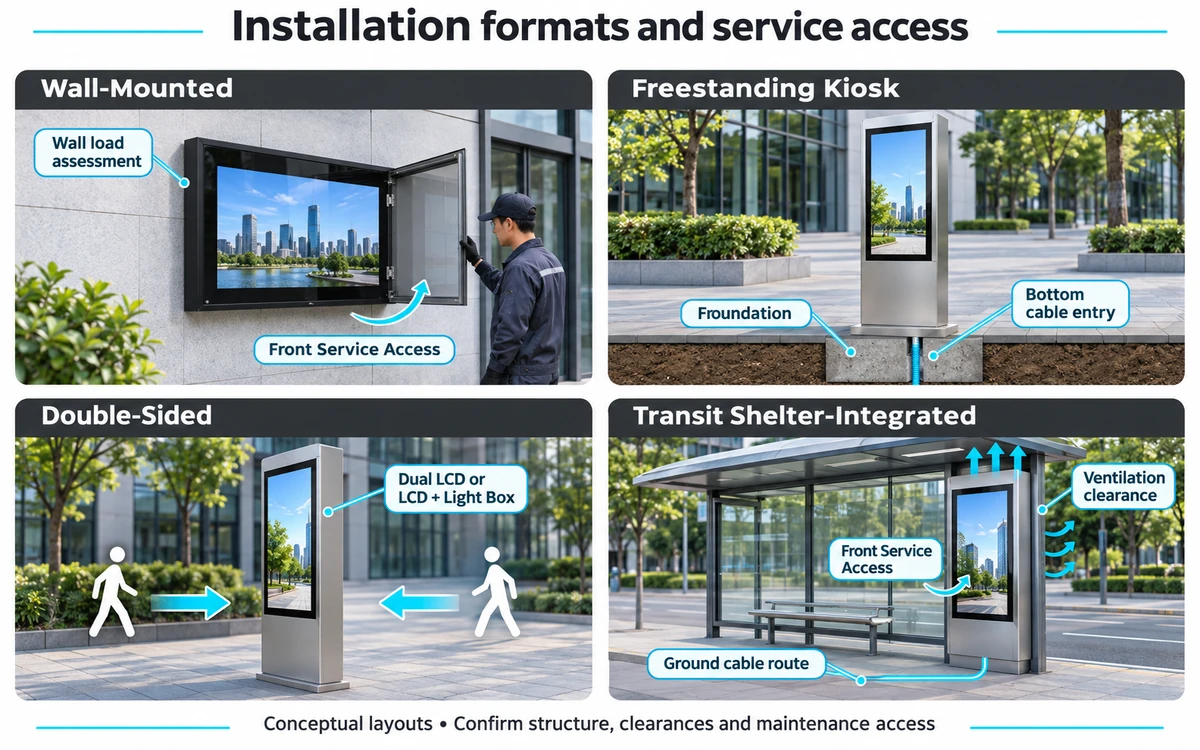
| Format | Project use to evaluate | Questions to resolve |
|---|---|---|
| Wall-mounted display | Menus or information beside a building | Can the wall carry the assembly, and can a technician reach the service opening? |
| Freestanding kiosk | Directions or advertising along a pedestrian route | Where will the foundation, cable entry and service door sit? |
| Double-sided display | Dual-direction pedestrian or vehicle traffic | Does the proposal include dual LCD screens or an LCD and a light box? |
| Shelter-integrated display | Information within a transit structure | Who approves the structure, ventilation and maintenance interface? |
On smaller screens, scroll the table to compare all columns.
How will the player, CMS and content work together?
Define the playback architecture before approving the display hardware. Record whether content comes from an external player, local storage or an application on the selected operating system, and who supplies the CMS.
Confirm interfaces and test the intended software version on the proposed hardware. An operating-system label alone does not establish compatibility with the customer’s publishing workflow or remote controls.
What happens when the network connection fails?
The answer depends on where content is stored and how the application handles lost connections. BrightSign’s developer guidance distinguishes internet-dependent streaming from local or cached content that reduces reliance on a persistent connection.
Ask the system provider to demonstrate the agreed fallback behavior. Test network loss, reconnection and a power restart, including any live feeds that cannot continue updating offline.
Which content and management functions should you test?
Test the functions the operator intends to use, including publishing permissions, scheduling, languages and external data feeds. Confirm which status information the system can report and whether remote actions affect playback, the display or both.
For outdoor content, check essential information first: legible text, clear contrast and an appropriate amount of detail. Test nighttime presentation and any interactive workflow at the installed position.
What must be ready before installation?
The site team needs approved mounting information, power and data arrangements, service access and an agreed installation sequence. Assign the structural, electrical and system tasks to named parties before equipment arrives.
Confirm local requirements with the responsible project team, including any permits or operating restrictions. Installation should follow the supplied manual and approved project design; a general buying guide cannot provide foundation sizes, anchor selections or electrical specifications for an unknown site.
What should the handover record contain?
The handover should identify the installed equipment and record the checks agreed with the customer. Include serial numbers, configuration and software versions, approved drawings, operating settings, maintenance instructions and support contacts.
Record any unfinished work with its responsible party and completion condition. Demonstrate content updates and the agreed recovery behavior, then retain the customer’s acceptance record with the installation documents.
How should you compare outdoor digital signage costs?
Compare the installed and supported system over an agreed ownership period. Separate the display price from integration and recurring costs so distributors and integrators can explain what their quotation includes.
Request itemized costs for mounting or foundations, electrical and network work, shipping, installation, player hardware, software licenses, connectivity and maintenance. Include spare parts and service labor where they fall within the proposed scope. Use project quotations for the destination market instead of assuming a global price band.
How can you make supplier quotations comparable?
Give each supplier the same site brief and ask them to identify exceptions. Compare screen configuration, enclosure, cooling, player or operating system, software scope, test evidence, delivery terms and warranty responsibilities on matching rows.
Keep unresolved differences beside the price. Confirm how configuration changes affect the quotation and schedule, and identify which costs the local partner must still obtain before offering a complete project price.
How do you validate a supplier before a larger order?
Validate the proposed configuration through document review and an agreed sample or pilot process before approving a larger purchase. The evaluation should answer the customer’s project questions and produce a record that the production team can follow.
Request evidence linked to the exact model and configuration. Company brochures and general quality statements can introduce a supplier, while technical approval needs model-specific records.
What should a sample or pilot prove?
The pilot should demonstrate the agreed display behavior, software integration and service access under documented conditions. Set acceptance criteria before testing, then record the configuration, environment, results and unresolved issues with a named owner for each item.
Include the customer’s content and the functions needed at launch. Before releasing a batch, confirm how the approved sample relates to mass production and which changes require renewed approval.
How should partners agree maintenance and fault handling?
Agree who receives fault reports, diagnoses the problem, authorizes action and performs local repair. Confirm spare-parts arrangements, transport and labor costs, warranty exclusions and service response times in the applicable agreement.
Ask for a fault-report format that captures the unit identity, symptoms and site conditions. Review LCD display support and after-sales service alongside the project terms so the local partner can plan its own responsibilities.
Which Uniview LCD options can you shortlist?
Uniview LCD’s outdoor range includes freestanding kiosks and wall-mounted displays with configuration choices. Use the published product information to begin a comparison, then request a specification for the selected size, system and installation environment.
| Starting model | Published format | Published size and brightness options | Items to confirm |
|---|---|---|---|
| F130P outdoor digital signage kiosk | Floor-standing LCD kiosk | 43 to 98 inches; 2,000 to 4,000 nits | IP55 or IP65 configuration, cooling, system and optional touch |
| V130L outdoor wall-mounted display | Wall-mounted landscape LCD display | 32 to 98 inches; 2,000 to 4,000 nits | Enclosure configuration, cooling, mounting and front service clearance |
On smaller screens, scroll the table to compare all columns.
Source: Uniview LCD product pages, checked November 24, 2026. These are published series options; available combinations and supplied specifications require project confirmation.
What if the standard configuration needs changes?
Submit the required changes for feasibility review before fixing the design or schedule. For OEM and ODM LCD display customization, describe the enclosure, interfaces or integration requirements and identify which are essential to project approval.
Confirm the agreed hardware scope and validation plan in writing. Software, CMS licensing, system integration and on-site work require separate scope and provider confirmation.
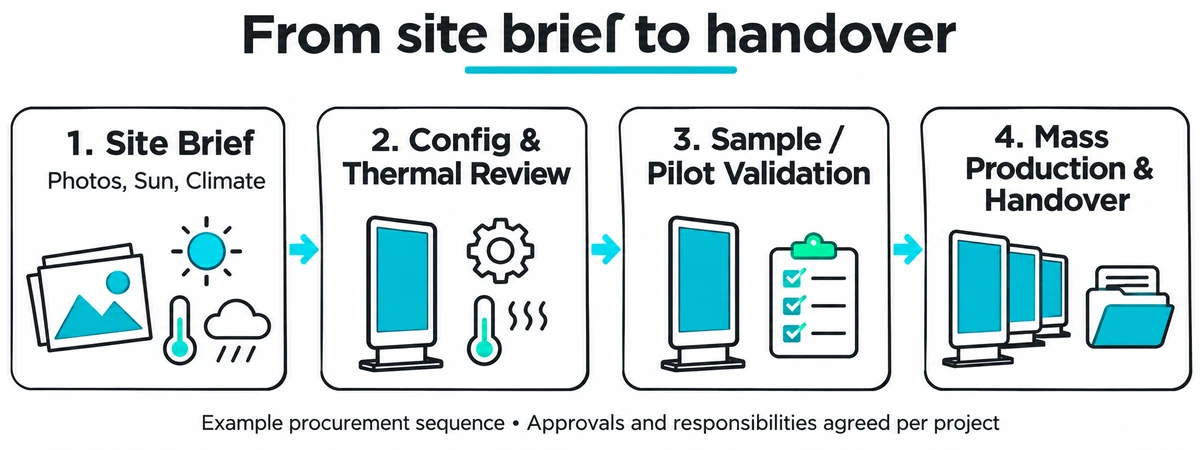
What should you send with a request for quotation?
Send a site and deployment brief that lets the supplier propose a configuration and identify open questions. Photos or drawings are useful when the buyer has not yet chosen every technical parameter.
Include:
- Installation country, city and site photos.
- Sun exposure, local climate conditions and planned operating hours.
- Required content, viewing position, screen size and orientation.
- Mounting format, available space and service access.
- Power, network, player, operating system and CMS requirements.
- Quantity, sample needs, rollout stages and required dates.
- Documents and acceptance criteria required by the project.
- Shipping destination and expected installation and support scope.
Compare the outdoor digital signage range, then contact Uniview LCD with the brief for configuration review.
Key questions to clarify before ordering
Clarify destination requirements, optional functions and commercial terms before issuing the purchase order. Keep technical approval and commercial approval visible as separate decisions so neither relies on assumptions carried over from a previous project.
Can one configuration serve every country?
A configuration needs review for each destination and installation environment. Ask for compliance documents covering the exact model and supplied options, and have the responsible local team confirm applicable requirements. Record any changes to power arrangements, connectivity, labeling or approval documents before reusing a specification in another market.
Does outdoor digital signage need a touchscreen?
Touch is optional when the application only needs scheduled information or advertising. Add it when users need to search, select or interact, then validate the complete workflow at the proposed location. Confirm the touch hardware, application, mounting height, accessibility requirements and maintenance arrangements together before including the feature in the order.
What delivery lead time should a partner promise?
A partner should promise a delivery date only after the supplier confirms an executable plan for the approved configuration and quantity. Separate design approval, sample evaluation, production, shipping and site readiness in the schedule. Record when the lead time starts and how changes or unresolved technical issues affect the commitment.
Is the quoted panel life the same as a warranty?
A panel-life figure and a warranty describe different things. Panel life (often quoted as 50,000 hours to half-brightness, or L70) is an estimate of LED backlight longevity under controlled test conditions, not a guarantee against component failure. Read the commercial warranty’s coverage, duration and exclusions separately, and align them with the maintenance and fault-handling terms agreed earlier.